



Keys, capos and chord shapes: what you're actually looking at
Why can two bandmates read different chord letters and still play together? We'll use Mile Marker Nine by The Loose Cables, BandBinder's own example song, with a chart line of G C D and Capo 6. The band hears Db Gb Ab.
For buttons, settings and tunings, see the Chord Help, transpose & capo control reference. The shortcuts below work in Chart View; on a Mac or iPad keyboard, use Cmd wherever we say Ctrl. You can also tap the controls.
The one idea everything rests on
A chord has a sound, what the band hears, and a shape, what your hands do. A guitar player can use a G shape without making a G sound. Mixing up those two meanings is where the confusion starts.
A key is the musical home of a song, the note and chords it feels settled around. Our example sounds in Db, even though the guitarist reads G shapes.
In BandBinder: open Chord Help (D) to see the shapes for your selected instrument.
Transposing changes the sound
Perhaps the song feels too low for your singer. Transposing moves the whole song to another key, so everyone plays higher or lower together. A semitone is one small step in pitch, like moving one fret on a guitar.
Move our example up two semitones, from Db to Eb:
| Before | After | |
|---|---|---|
| Sounding key | Db | Eb |
| Piano or bass chords | Db Gb Ab | Eb Ab Bb |
| Guitar shapes, capo still at 6 | G C D | A D E |
The guitarist keeps the capo in place for now. The new shapes make the new sound.
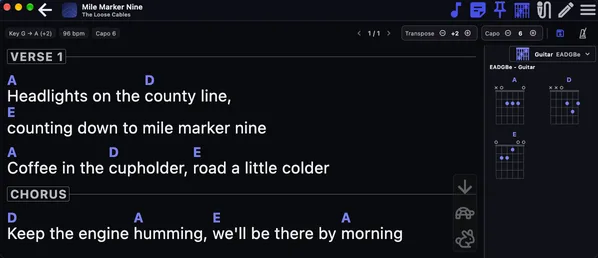
In BandBinder: use Transpose up (Shift +) twice; Transpose down (Shift -) twice returns to the original example.
A capo changes the shape, not the sound
A capo is a clamp across the strings at a fret. It raises their starting pitch, so familiar finger shapes produce higher sounds. To keep the same song key when moving the capo, you must also change the shapes you play; BandBinder does that change on the chart for you.
The song is in Db; capo on 6, you play G C D shapes, it still sounds Db. Without a capo, you'd need Db Gb Ab instead. This is a way to make the song more comfortable to play without asking the singer to change key.
In BandBinder: with Guitar selected, use Capo up (Ctrl +) or Capo down (Ctrl -) to choose shapes while keeping the sounding key.
Reading a capo chart
“Capo 6” means put the capo at the sixth fret. Read the letters as shapes relative to that capo: make your usual G, C and D shapes, treating the capo as the start of the strings. Those letters tell your hands what to do, not what the audience hears.
Our example chart is G C D, with Capo 6. Don't ask the pianist to play those same letters: the sounds to match are Db Gb Ab.
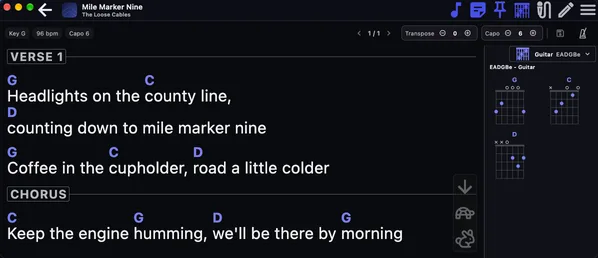
In BandBinder: show Chord Help (D) and use Instrument (I) to select Guitar and read its capo shapes.
The key on a capo chart
The key on a capo chart is usually the key of the shapes, not the key the audience hears. For example, Key G, Capo 6, with G C D on the chart sounds in Db. Some charts write the sounding key instead; BandBinder works out which meaning fits from the chords. The written key isn't a promise that every instrument will show those same letters.
In BandBinder: use Instrument (I) in Chord Help (D) to compare the guitar shapes with piano's sounding chords.
Why your bandmates see different chords
Piano and bass wear no capo. They need the sounding chord names, so everyone matches the same music. Here is the same moment in our original song:
| Player | Chart line | Capo |
|---|---|---|
| Guitarist | G C D | 6 |
| Pianist | Db Gb Ab | None |
| Bassist | Db Gb Ab | None |
Changing the Chord Help instrument changes both the chart letters and the diagrams. It doesn't transpose the song. For piano and bass, the Capo control is dimmed because there is no capo to adjust.
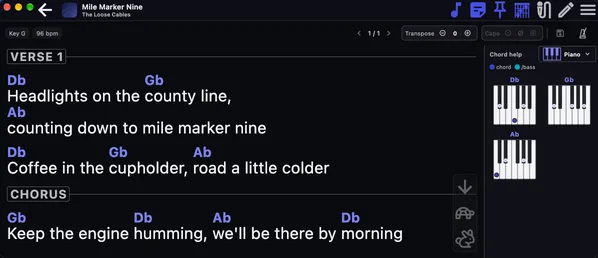
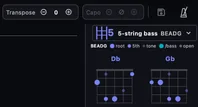
In BandBinder: enable your instruments in Settings, then use Instrument (I) with Chord Help (D) open to switch between them.
Ukulele and capo
Ukulele starts with no capo, so our example shows Db Gb Ab. You can choose a capo for your own playing: at capo 1, the ukulele shows C F G shapes, still sounding Db Gb Ab. Baritone uke also has its own capo setting.
Your ukulele capo is yours alone. It doesn't change the guitar capo and isn't saved. It stays while you switch instruments on this chart; loading another chart resets it to zero.
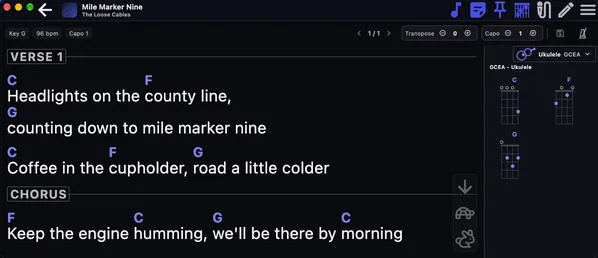
In BandBinder: select Ukulele with Instrument (I), then use Capo up (Ctrl +) once from zero.
Using both together
First find the key your singer likes, then choose comfortable shapes. Start again with our Db song and guitar capo 6. Transpose up twice: the song now sounds in Eb and the guitar shows A D E. Next raise the guitar capo twice, to 8: the shapes become G C D again, but the song still sounds in Eb.
Piano and bass now show Eb Ab Bb. You've changed the band's key with Transpose, then made your own part easier with Capo.
In BandBinder: use Transpose up (Shift +) twice, then Capo up (Ctrl +) twice with Guitar selected.
Common questions
Why does my chord say Db when I expected C#?
They're the same note with two names. BandBinder uses the name that fits the key the song sounds in, so our Db example uses Db rather than C#.
Why did my chords change when I opened Chord Help?
With Chord Help hidden, you see guitar shapes at the guitar capo. Opening it shows the selected instrument's version, so piano, bass or ukulele can show different letters while making the same sounds.
Why is the Capo control greyed out?
Piano and bass don't use a capo, so that control is disabled for them. Choose Guitar or a ukulele instrument if you want to adjust capo shapes.
I changed the capo and it did not save
A ukulele capo is temporary and never saved. For guitar changes made from the Song Library, use Save transpose/capo to song; during setlist playthrough, guitar changes belong to that setlist entry instead.
Which do I use to make the song easier to sing?
Use Transpose to move the song higher or lower. Everyone in the band needs to play in that new sounding key.
Which do I use to make it easier to play?
Try Capo to find comfortable shapes on guitar or ukulele. BandBinder changes the shapes to keep the song sounding in the same key.
In BandBinder: use Save transpose/capo to song (Ctrl S) for guitar or transpose changes outside setlist playthrough; ukulele capo changes never enable Save.